AI Product Photography Prompts: How to Create Studio-Quality Shots Without a Studio
A working prompt playbook for ecommerce founders, Etsy sellers, and brand designers — generate magazine-grade product photos with Midjourney, Nano Banana 2 and GPT-Image without ever booking a studio.
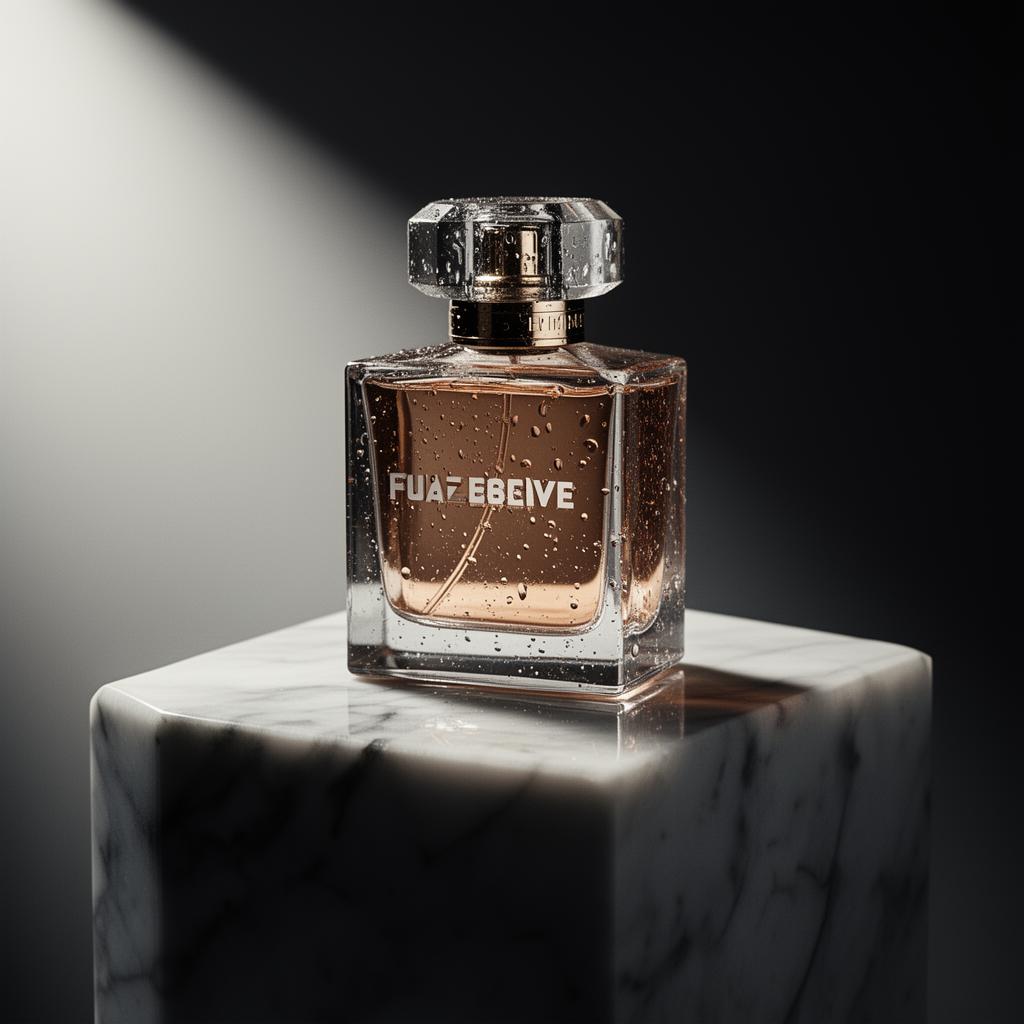
Table of contents
- Why most AI product photos still look fake
- The PROMPT-5 framework for product photography
- A lighting vocabulary you can actually use
- Copy-paste prompt templates
- The premium hero shot (Midjourney V7)
- The lifestyle flat lay (Nano Banana 2)
- The colored-background hero (GPT-Image)
- The on-model lifestyle shot
- Choosing the right model for the job
- Common mistakes that scream "AI photo"
- Advanced techniques the pros use
- Reference image conditioning
- Two-pass workflow: scene then product
- Bracket the prompt with format anchors
- Build a brand prompt block
- A quick-reference table: prompt ingredients by use case
- Quick wins you can ship today
- When to still hire a real photographer
- Conclusion: think like an art director, not a prompter
A good product photo used to cost you a half-day in a rented studio, a stylist, a $4,000 camera, and a retoucher who quietly rebuilt your shadows in Photoshop. In 2026, the same shot — sometimes a better one — costs you a careful paragraph of text.
But here's the catch nobody puts in the YouTube thumbnails: most AI product photos still look like AI product photos. The bottle floats with no shadow. The label warps into nonsense. The lighting is flat in a way real studio lighting never is. The background screams "Midjourney default."
This guide is the working playbook I use with ecommerce founders and small brand teams to fix exactly that. You'll get the prompt anatomy that consistently produces commercial-grade output, copy-paste templates for Midjourney V7, Nano Banana 2 (Gemini 3.1 Flash Image) and GPT-Image, the lighting vocabulary that separates amateurs from art directors, and the specific tells that make AI photos look fake — so you can kill them before you upload to Shopify.
If you'd rather skip the theory and generate a structured, model-ready product prompt from a single sentence, our free AI Prompt Generator does exactly that. Otherwise, read on.
Why most AI product photos still look fake
Before we write a single prompt, it helps to know what you're fighting. Real commercial product photography has roughly five things AI tends to fumble:
- Believable shadows — direction, softness, and contact with the surface. Floating shadows are the #1 AI tell.
- Material honesty — glass that refracts, metal that reflects the studio, fabric with weave.
- Label legibility — readable typography on the product (still hard, even on the best 2026 models).
- Restraint — one hero subject, calm composition, no "everything is happening" background.
- Imperfection — dust, slight asymmetry, an off-center water droplet. Perfect = plastic.
Every section below maps back to one of these. If you remember nothing else, remember: cinematographers control light, not subjects. The same is true for product prompts.
Expert insight. I once watched a DTC founder spend a week iterating prompts to "make the bottle look more premium." The bottle was fine. The lighting was the problem. Once we swapped a flat softbox prompt for "single rim light from camera right, 45-degree angle, deep falloff into shadow," the product looked five times more expensive — same bottle, same model, same prompt length.
The PROMPT-5 framework for product photography
After running thousands of generations for paid client work, almost every prompt that ships to production follows the same five-part skeleton. I call it PROMPT-5 because I needed a name and "the five things you have to specify" wasn't catchy.
1. Product — what is it, precisely? "Glass perfume bottle" beats "perfume." Include material, color, finish, and any signature shape.
2. Placement — where does it sit? Marble pedestal, linen sheet, wet pavement, polished concrete. The surface determines the shadow and half the mood.
3. Lighting — direction, hardness, color temperature. This is the single highest-leverage line in your prompt.
4. Lens & framing — focal length, angle, depth of field. "85mm macro, eye-level, f/2.8, shallow depth of field" reads like a camera order because it is.
5. Mood & style reference — "editorial Vogue still-life," "Apple keynote product render," "Aesop minimalist apothecary." Two or three words of reference, never more.
Drop any of these and the model fills in the blank — usually badly. Specify all five and you eliminate 80% of revision loops.
A lighting vocabulary you can actually use
Most prompt guides hand-wave lighting with "good lighting" or "studio lighting." Those words mean nothing to a diffusion model. What works is the actual on-set terminology cinematographers and product photographers use. Internalize a dozen of these and your output quality jumps overnight.
- Soft directional light from camera left — the editorial default. Gentle gradient, gentle shadow.
- Hard rim light from behind — separates the product from the background, creates that "premium glow" outline.
- Single overhead spotlight, theatrical falloff — drama, luxury, perfume-ad energy.
- Diffused window light, golden hour — natural, warm, lifestyle-friendly. Pairs well with linen and wood.
- Three-point softbox setup, even exposure — clean Amazon-style product shot. Boring but converts.
- Top-down ring light on glossy surface — flat lay specialty. Watch for unwanted reflections of the "camera."
- Backlit through frosted scrim — gorgeous for liquids and translucent packaging.
- Single LED panel from low angle, long shadow upward — moody, editorial, almost cinematic.
Use one. Not three. Combining lighting setups in a single prompt produces a confused, doubly-lit result that no real photographer would ever shoot.
Copy-paste prompt templates
These are battle-tested skeletons. Replace the bracketed parts with your product. They work in Midjourney V7, Nano Banana 2 (Gemini 3.1 Flash Image), and GPT-Image with very minor tweaks.
The premium hero shot (Midjourney V7)
A [glass perfume bottle with amber liquid and a brushed gold cap] sitting on a [polished white marble pedestal], single rim light from camera right at 45 degrees, deep shadow falloff into a charcoal grey background, 85mm macro lens, f/2.8, shallow depth of field, water droplets on the glass, editorial Vogue still-life, ultra realistic commercial product photography --ar 4:5 --style raw --v 7The lifestyle flat lay (Nano Banana 2)
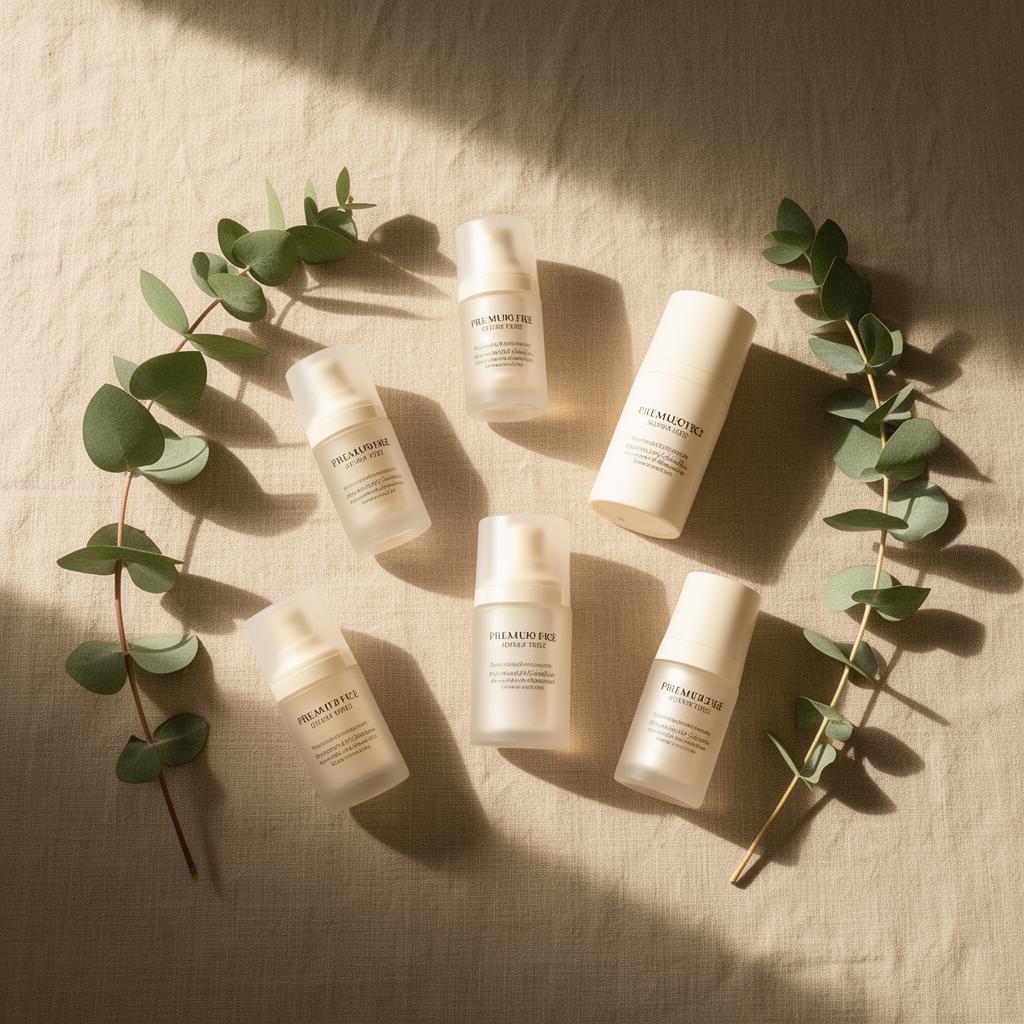
Overhead flat lay of [a skincare serum bottle and a small ceramic dropper] arranged on a beige linen sheet with two sprigs of eucalyptus, soft morning window light from the left casting long natural shadows, warm cream tone, minimalist Aesop-style styling, shot on 50mm, square crop, photorealistic.The colored-background hero (GPT-Image)
A single [pair of black wireless over-ear headphones] floating slightly above a smooth gradient coral background, soft hard shadow directly below for grounding, three-point softbox lighting with subtle highlights on the ear cups, clean modern advertising style, no text, square format, ultra-crisp.The on-model lifestyle shot
Close-up of a person's hands holding [a matte ceramic coffee mug with steam rising], shallow depth of field on the mug, soft window light from camera left, warm autumn morning, linen sweater visible out of focus in the background, lifestyle editorial, shot on 35mm at f/2.0, photorealistic.Pro tip. Always negative-prompt or explicitly forbid the things your model loves to hallucinate: --no text, watermark, extra bottles, blurry label on Midjourney; "no text on packaging, no duplicate products, no warped logo" written into the prompt on Nano Banana.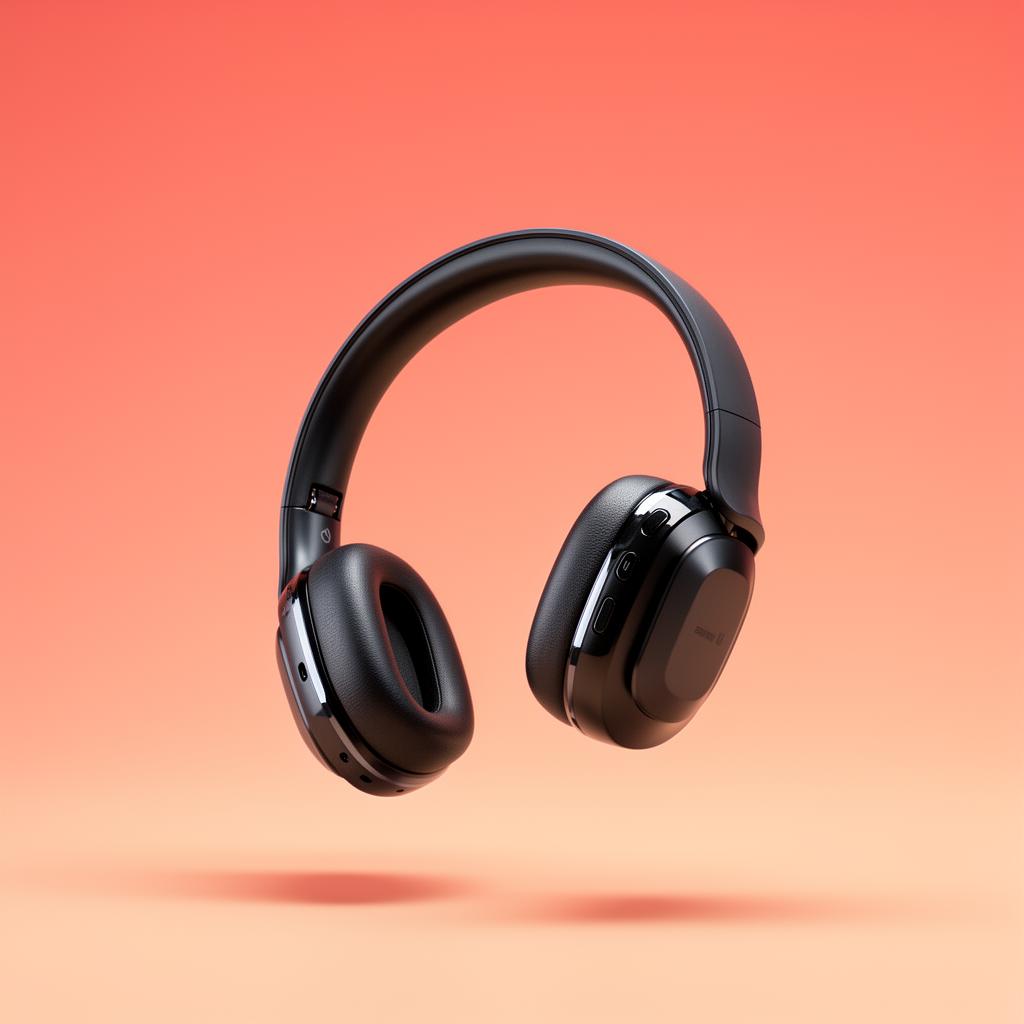
Choosing the right model for the job
Each of the major 2026 image models has a personality. Picking wrong adds 30 minutes of re-rolling. Here's the short version:
- Midjourney V7 — best for editorial, moody, magazine-style hero shots. Worst for legible text on labels.
- Nano Banana 2 (Gemini 3.1 Flash Image) — best for fast iteration, lifestyle scenes, and especially for editing an existing product photo (swap background, change angle, recolor). Excellent prompt-following.
- GPT-Image (gpt-image-2) — best when you need legible text on packaging, clean studio-style ads, or tight brand consistency across a set.
- Flux 1.1 Pro — strong all-rounder for realism, particularly skin, fabric, and natural light. Less artistic flair than Midjourney.
- Ideogram 3.0 — when label typography has to be exactly right. Slightly stiffer compositions.
Rule of thumb: if your product has a readable logo or label, generate the scene in Midjourney, then edit the product in with Nano Banana or GPT-Image. The split workflow consistently beats trying to do both in one shot.
Common mistakes that scream "AI photo"
These are the things I flag every single week on client decks. None of them are hard to fix once you know to look.
- No contact shadow. The product looks pasted on. Add: "with a soft contact shadow directly beneath the product, anchoring it to the surface."
- Symmetrical perfection. Real photos have a tilted label, a stray droplet, a fingerprint. Add: "slight asymmetry, one bead of condensation off-center."
- Confused light sources. Two highlights from opposite directions. Pick one main light, mention it once, don't list backups.
- Hyperreal "render" look. Too clean, too saturated, too perfect. Add: "shot on film, subtle grain, natural color, slight imperfection."
- The disappearing horizon. Background fades to pure white with no seam. Add: "seamless paper backdrop with subtle gradient from light grey at top to mid grey at bottom."
- Warped or invented typography. If the logo matters, generate the product naked and composite the real label in Photoshop or Figma. Don't fight the model.
- Default Midjourney aesthetic. That slightly orange, slightly cinematic, slightly-the-same-as-everyone-else look. Use
--style rawand specify mood references that aren't "cinematic."
Advanced techniques the pros use
Once the basics are clicking, these are the moves that take output from "good for an indie brand" to "this could run in a magazine."
Reference image conditioning
On Midjourney, drop in a reference image of the lighting style you want (not the product) and use --sref. On Nano Banana, upload the actual product photo and prompt: "keep the product identical, change the background to a sunlit Mediterranean terracotta wall." This solves the label-warping problem in one move.
Two-pass workflow: scene then product
Generate the empty scene first — pedestal, lighting, mood. Then in a second pass, composite or inpaint the product into it. The model only has to solve one problem at a time, which is why output quality goes up.
Bracket the prompt with format anchors
Start with the camera spec, end with the style reference. Diffusion models weight tokens at the edges of the prompt more heavily than the middle. "Shot on Hasselblad H6D, 100mm macro, f/4 […] editorial Kinfolk still life" frames the whole generation.
Build a brand prompt block
For consistent brand output, save a 30-word "house style" block — lighting, color palette, surface, mood — and prepend it to every product prompt. This is how DTC brands generate 200 SKU shots that all feel like one brand.
A quick-reference table: prompt ingredients by use case
| Use case | Surface | Lighting | Lens | Mood reference | | --- | --- | --- | --- | --- | | Luxury hero shot | Polished marble | Single rim light, hard shadow | 85mm, f/2.8 | Editorial Vogue | | Amazon listing | Seamless white paper | Three-point softbox, even | 50mm, f/8 | Clean studio | | Lifestyle flat lay | Linen, wood, ceramic | Soft window, golden hour | Overhead 35mm | Aesop, Kinfolk | | Sport / energy | Wet asphalt, concrete | Hard sun, sharp shadow | 24mm wide, low angle | Nike campaign | | Skincare / clean beauty | Frosted glass, pastel | Diffused front light | 100mm macro, f/4 | Glossier minimalism | | Tech / gadget | Gradient seamless | Backlit + soft fill | 50mm, f/5.6 | Apple keynote |
Print this table. It's the single most-used artifact from my own workspace.
Quick wins you can ship today
If you only do five things from this article, do these:
- Add an explicit lighting direction to every prompt. "Single soft light from camera left."
- Specify a real lens. "85mm macro, f/2.8."
- Name a real surface. "On a polished travertine slab."
- Add a contact shadow line. "Soft shadow directly beneath the product anchoring it."
- Reference one editorial style, not three. "Kinfolk still-life aesthetic."
That's it. Five lines added to your existing prompts and you'll out-shoot 90% of AI product photos on Etsy and Shopify tomorrow.
When to still hire a real photographer
Worth saying plainly: AI is not always the right tool.
- Apparel on real human bodies — fit, drape, and skin nuance still favor real shoots. AI try-on is closing the gap, but for hero campaigns, shoot it.
- Food where texture matters — steam, sauce viscosity, melt — still hard.
- Anything with a complex transparent product label — you'll spend more time inpainting than shooting would have cost.
- High-stakes brand campaigns — when one image runs everywhere for six months, the cost of a real shoot is rounding error against the risk of an AI tell going viral.
For everything else — secondary product shots, social posts, lifestyle context, seasonal variants, A/B test creative — AI is now the obvious choice on cost, speed, and iteration count.
Conclusion: think like an art director, not a prompter
The biggest unlock isn't a magic prompt. It's a mindset shift: stop writing requests, start writing briefs. Every prompt in this guide is essentially a one-paragraph creative brief — product, surface, light, lens, mood. That is exactly how human photographers receive jobs, and exactly the input a modern image model is best at executing.
Pick one product in your store. Write a single PROMPT-5 brief for it tonight. Generate ten variations. Pick one. Ship it. Then do it again tomorrow with sharper light direction. Within a week your store's visual language will be unrecognizable — and you'll never look at a $400 studio rental the same way again.
For more on writing the kind of prompts that actually move the needle, read our complete ChatGPT prompts playbook, or jump into the Midjourney viral content guide for prompt patterns that work on social.
Frequently asked questions
What is the best AI model for product photography in 2026?+
There is no single winner. Midjourney V7 is best for editorial hero shots, Nano Banana 2 (Gemini 3.1 Flash Image) is best for fast iteration and editing existing photos, and GPT-Image is best when product labels need to be legible. Most professional workflows use Midjourney for the scene and Nano Banana or GPT-Image to insert the actual product with a clean label.
Can AI product photos be used on Amazon, Shopify, and Etsy?+
Yes on Shopify and Etsy with no restrictions. Amazon allows AI imagery in lifestyle and secondary slots but still requires the main product image to accurately represent the item on a pure white background — many sellers generate AI lifestyle shots and use a real or AI-clean studio shot as the primary.
Why does my AI product photo look fake?+
Almost always one of three things: no believable contact shadow under the product, a confused or flat lighting direction, or a warped logo or label. Fix the shadow with an explicit prompt line, specify one (not multiple) light directions, and if the label matters, composite the real product label in afterwards.
How do I keep my brand consistent across many AI product photos?+
Build a reusable 'house style' prompt block — surface, lighting, palette, mood reference — and prepend it to every product prompt. Pair it with reference image conditioning (Midjourney --sref or Nano Banana image input) to lock the visual language across an entire catalogue.
What focal length should I specify in an AI product photo prompt?+
85mm to 100mm macro for hero shots and close detail, 50mm for lifestyle and flat lays, 24-35mm for wide environmental shots. Specifying a real lens forces the model into a believable perspective and depth of field instead of the default 'everything in focus' look.
Are AI-generated product images legal to sell with?+
Generally yes for products you own. Avoid generating with trademarked logos, copyrighted character likenesses, or competitor product designs. Always check the terms of your chosen model — Midjourney, OpenAI and Google all grant commercial usage on paid plans, but with restrictions around trademarks and likeness.