How to Make Realistic AI Images That Pass as Real Photography
A full breakdown of the prompts, lenses, lighting and post-processing tricks that make AI-generated images indistinguishable from real photography in 2026.
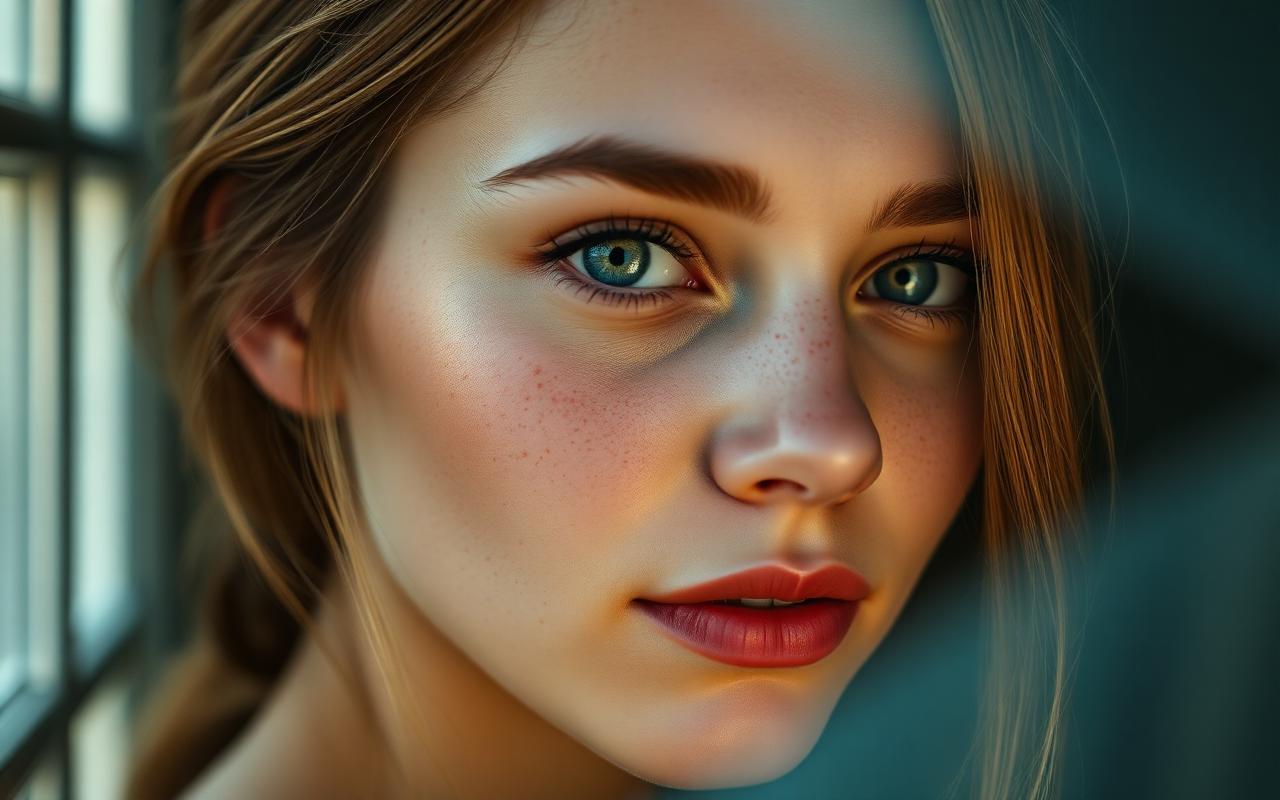
Table of contents
- What "realistic" actually means to a model
- Use words real photographers use
- The realism prompt structure
- A prompt that actually works
- Lighting: the single biggest tell
- Specify direction
- Skin texture without the plastic look
- Post-processing: the 30-second realism pass
- Tools that pair well with realism prompts
- Ethics and disclosure
- Common realism mistakes to avoid
- Conclusion
The line between an AI image and a real photo collapsed in 2025. In 2026 it is gone entirely — but only for creators who know what they are doing. A casual prompt still screams "AI". A structured prompt that speaks the language of real photography produces images that even professional photographers can't reliably flag.
This guide is the full playbook: the prompt structure, the camera and lens vocabulary, the lighting setups, the skin-texture tricks, and the lightweight post-processing that pushes a generation across the uncanny valley. Everything here works in Midjourney v6.1, Flux 1.1 Pro, and SDXL with realism LoRAs.
What "realistic" actually means to a model
Image models do not understand "real". They understand statistical similarity to their training data. If most photos in the training set were shot on full-frame DSLRs with 85mm lenses under window light, then using that exact language is what tells the model "render this like a photo, not like art".
So the first rule is brutal: stop using words like realistic, 4k, hyperdetailed and photorealistic. Those words mostly appear in AI-art prompts, not in real photo metadata. They actively push the model toward the "AI image" cluster.
Use words real photographers use
- Camera bodies: Hasselblad H6D, Phase One IQ4, Canon R5, Leica Q3, Sony A7R V
- Lenses: 85mm, 50mm, 35mm, 24-70mm, 100mm macro
- Apertures: f/1.4, f/2.0, f/2.8, f/4
- Film stocks: Kodak Portra 400, Cinestill 800T, Fuji Pro 400H
- Lighting: window light, golden hour, overcast soft light, single softbox, practical lamps
These tokens map directly onto photographs in the training set. The model rewards you for using them.
The realism prompt structure
The skeleton that consistently produces photo-passing results:
[subject with one specific human detail], [pose / micro-action],
[real environment with one anchoring object], shot on [camera] [lens]
at f/[aperture], [lighting source], [film stock], [--ar] [--style raw]
The "one specific human detail" is the secret. Real photos always have an imperfection — a stray hair, a slight squint, an undone button. Bake that into the subject description and the brain stops flagging the image as synthetic.
A prompt that actually works
a 34-year-old woman with a small scar on her left eyebrow, mid-laugh,
sitting at a wooden kitchen table with a half-eaten croissant and a
white ceramic mug, shot on Leica Q3 28mm at f/2.0, soft north-facing
window light from camera-left, Kodak Portra 400, --ar 4:5 --style raw
Run that and compare it to the same prompt with the scar, the croissant, and the camera language removed. The difference is the difference between "AI portrait" and "candid photo from a friend's brunch".
Lighting: the single biggest tell
Bad lighting is what gives away 80% of AI images. Models default to flat, evenly-lit, beauty-dish-style fill. Real photographs almost never look like that.
The four lighting setups that read as "real":
- Window light — soft, directional, slightly cooler than the room
- Golden hour backlight — long shadows, lens flare, warm rim around the subject
- Single practical — one lamp visible in the frame, motivating the light
- Overcast outdoor — flat shadows, neutral color, the most "documentary" of all
Add one of these to every realism prompt. Stop using the word cinematic in realism work — it pushes the model toward over-graded movie stills, not photos.
Specify direction
"Lit from above" looks fake. Real photographers describe light by origin and quality:
- soft light from camera-left
- backlight through a sheer curtain
- bounce light from a white wall on camera-right
- single tungsten lamp behind subject, slight halation
The more it sounds like a lighting diagram from a photography course, the more the model commits.
Skin texture without the plastic look
Skin is where AI realism dies. The default Midjourney pass smooths skin into a wax figure. Three fixes, in priority order:
- `--style raw` — disables the beautification pass. Non-negotiable for portraits.
- Add texture vocabulary — visible pores, peach fuzz, slight redness on cheekbones, subsurface scattering
- Specify imperfections — freckles across nose, faint laugh lines, dry lips, single stray hair across forehead
The combination is what makes the image feel like skin instead of looking like skin.
Post-processing: the 30-second realism pass
Even a perfect generation benefits from a light edit. The goal is not to make the image prettier — it is to add the small camera artifacts that all real photos have.
In any editor (Lightroom, Photoshop, even free tools like Photopea):
- Add 1–3% grain — matches the noise floor of a real sensor
- Drop sharpness by 10% — AI images are unnaturally crisp at pixel level
- Add a subtle vignette — every real lens has falloff
- Slight chromatic aberration on edges — the smoking gun of authenticity
The whole pass takes 30 seconds and pushes a 95% convincing image to 99%.
Tools that pair well with realism prompts
Beyond Midjourney itself, three tools deserve a place in any realism workflow:
- Flux 1.1 Pro — currently the strongest open model for photorealism, especially hands
- Magnific AI — upscaler that adds plausible texture rather than just resolution
- Topaz Photo AI — for finishing skin and adding believable grain
For prompt construction, the PromptMint AI Prompt Generator will assemble a realism-ready prompt around your idea using the exact structure described above. If your goal is more stylized or cinematic instead, our guide to the best cinematic AI prompts covers the parallel track.
Ethics and disclosure
A quick but important note. As AI realism crosses the photo threshold, disclosure matters more, not less. Use AI-realistic imagery for fiction, concept work, commercial assets you have rights to, and personal projects. Do not use it to impersonate real people or misrepresent real events. Both Midjourney's terms of service and the EU AI Act now require clear labeling of synthetic media in many contexts.
If you publish AI images on the open web, add an alt attribute that says so, and consider embedding C2PA content credentials — they are becoming the standard for provenance.
Common realism mistakes to avoid
Five patterns that immediately re-flag an image as AI:
- Using the word photorealistic in the prompt (paradoxically pushes toward CGI)
- Specifying impossible lighting (two key lights from opposite directions)
- Symmetrical faces with zero asymmetry
- Overlit eyes with twin perfect catchlights
- Backgrounds that are too clean — real environments always have clutter
Fix any one of these and quality jumps. Fix all five and you are reliably producing photo-passing work.
Conclusion
Hyper realistic AI images in 2026 are not a model problem — they are a vocabulary problem. Speak the language of real photography: real cameras, real lenses, real lighting, real human imperfections. Add a 30-second post-processing pass for grain and vignette. Skip the words realistic and 4k entirely.
Do that consistently and the question stops being "is this AI?" and starts being "who shot this?" — which is exactly the bar serious creators should be aiming for.
Frequently asked questions
Why do my AI images still look fake even with detailed prompts?+
The most common cause is missing camera language and lighting direction. Add a specific camera body, lens focal length, aperture and a real lighting source (window light, golden hour backlight, single practical) and quality jumps immediately. Also remove the words 'realistic', '4k' and 'photorealistic' — they push the model the wrong way.
Which AI model is most realistic in 2026?+
Flux 1.1 Pro is currently the strongest for raw photorealism, especially hands and skin. Midjourney v6.1 with --style raw is a close second and easier to direct. SDXL with realism LoRAs is the most customizable but requires more setup.
Do I need post-processing to make AI images look real?+
A 30-second pass helps. Add 1–3% grain, reduce sharpness by 10%, add a subtle vignette and slight chromatic aberration on the edges. These are the natural artifacts of real lenses and sensors that AI images miss by default.
Is it legal and ethical to publish hyper realistic AI images?+
Yes, with caveats. You generally own commercial rights to images made with paid tiers of Midjourney, Flux and SDXL. Do not use AI realism to impersonate real people or misrepresent real events, and disclose AI involvement where local law (such as the EU AI Act) requires it.